
Download Avid Free DV – video editor, free video editing software, home video editing, beginner video editor, video trimming tool, simple video editing
Overview
Avid Free DV is a cost-free video editing tool developed by Avid Technology, Inc., designed to support amateur home video editors in creating polished content with minimal complexity. As a lightweight application released on February 7, 2006, it serves as an accessible entry point into professional-grade video editing workflows. The app aims to reduce the learning curve typically associated with video editing software by offering a streamlined interface and essential tools tailored for users with limited experience.
It addresses common challenges faced by beginners, such as overwhelming controls, steep learning curves, and the need for expensive software. By providing a simplified environment, Avid Free DV enables users to focus on creativity rather than technical navigation. Its purpose extends beyond basic editing—it also acts as a demonstration platform for the premium Avid Xpress DV, offering a taste of professional features in a beginner-friendly format.
Target users include hobbyists, students, and individuals documenting personal events such as weddings, travel, or family gatherings. The app is particularly valuable for those exploring video editing without financial investment. Although the developer did not provide additional technical details about system integration or real-world performance, its continued relevance in the video editing ecosystem lies in its role as an educational and experimental tool for aspiring creators.
Key Features & Functionality
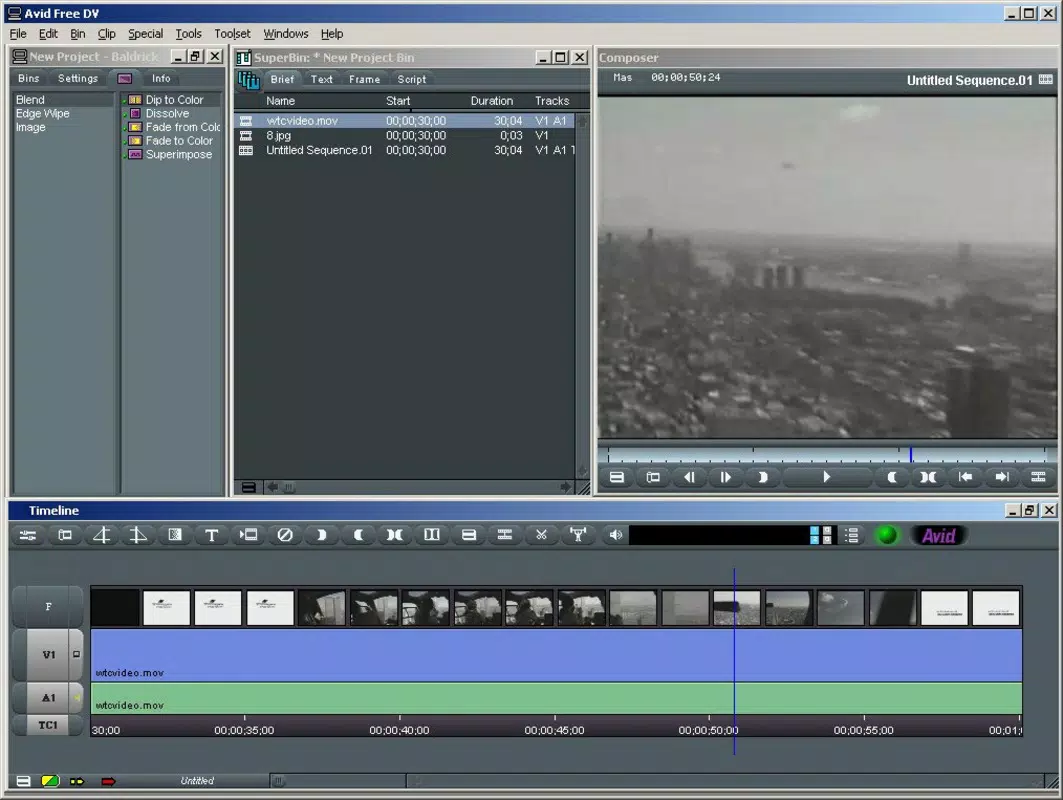
- User-Friendly Interface: Avid Free DV features a simplified layout that prioritizes accessibility for beginners. The design minimizes clutter and groups tools logically, enabling users to locate essential functions quickly. This intuitive structure supports a smooth onboarding experience, allowing even first-time editors to start cutting and trimming footage without prior training.
- Basic Editing Tools: The app includes core functionalities such as cutting, trimming, and arranging video clips. These tools are designed for straightforward manipulation of raw footage, making it easy to remove unwanted segments or reorder scenes. Users can perform essential edits to create cohesive narratives from unedited recordings.
- Quality Visual Effects: Avid Free DV offers a selection of built-in visual effects that can be applied to enhance video clips. These effects range from simple transitions to subtle color adjustments, helping users elevate the visual appeal of their projects. The tools are designed to be easy to apply, ensuring that users can achieve a professional look without deep technical knowledge.
- Sample Range of Features: While not a full-featured editor, the software provides a curated set of tools that reflect the capabilities of the premium Avid Xpress DV. This sampling allows users to experience professional workflows in a controlled, beginner-safe environment. It encourages exploration and may inspire users to consider upgrading to more advanced versions in the future.
- Free Activation Process: The software is available at no cost, with activation requiring only a demo serial number and authorization code. This straightforward process eliminates financial barriers and allows immediate access to the editing environment. The absence of hidden fees or subscription models supports its role as a risk-free trial for aspiring video creators.
Interface, UX & Performance
The interface of Avid Free DV reflects a minimalist design philosophy, emphasizing clarity and ease of use. Navigation is structured around a timeline-based workspace, where video clips are arranged and edited in sequence. The layout places key tools within easy reach, reducing the need for deep menu diving. Although the developer did not list formal performance metrics, the app’s lightweight file size of 14.2 MB suggests efficient resource usage.
Users can expect responsive interactions, particularly on devices with standard configurations for the time of release. The app maintains stability during basic editing tasks such as trimming and applying transitions. However, specific requirements for optimal performance were not disclosed, and compatibility with modern systems remains uncertain. The developer did not specify minimum OS requirements or hardware capabilities, so users should proceed with caution when attempting installation on newer platforms.
Overall, the user experience is designed to be frictionless for its intended audience. The lack of complex settings or advanced configurations ensures that users can begin editing immediately. While modern standards may demand higher performance, the app’s enduring presence underscores its utility as a foundational tool for learning video editing fundamentals.
Platform Compatibility & Technical Requirements
Avid Free DV is available exclusively for the Windows platform. It was released in version 1.0.0 with a file size of 14.2 MB. The app is free to download and install, with no cost associated with its use. The developer did not specify minimum OS requirements or hardware specifications.
Compatibility information was not fully disclosed, making it difficult to determine whether the software runs on current Windows versions such as Windows 10 or 11. Users may encounter installation or runtime issues on modern systems due to outdated system dependencies or missing drivers. The lack of updated technical documentation limits its usability in contemporary environments.
Despite these limitations, the app remains accessible for users running older Windows systems or virtual machines configured for legacy software. For those seeking a lightweight, no-cost solution for basic video editing, Avid Free DV may still serve as a viable option, provided the system meets unlisted requirements.
Pros and Cons
Pros
- Free to download and use with no hidden fees
- Simple, beginner-friendly interface designed for non-professionals
- Provides access to essential editing tools like cutting, trimming, and transitions
- Offers a glimpse into professional video editing workflows through curated features
- Easy activation process with demo credentials
Cons
- Not compatible with modern operating systems without potential workarounds
- Limited feature set compared to contemporary video editors
- Developer did not provide technical specifications or system requirements
- Outdated release date raises concerns about security and long-term support
- May not support current video formats or hardware acceleration
FAQ
Is Avid Free DV safe to download and install?
The app is distributed by Avid Technology, Inc., a reputable developer in the video editing industry. However, due to its age and lack of recent updates, users should exercise caution and scan the file with up-to-date antivirus software before installation.
Can I use Avid Free DV on Windows 10 or 11?
The developer did not specify compatibility with current Windows versions. While some users may succeed in running it via compatibility mode or virtual machines, there is no guarantee of stable performance or full functionality.
Does Avid Free DV require a license or subscription?
No. The software is free to use and does not require a subscription. Activation is handled through a demo serial number and authorization code, which are provided for temporary access.
What types of video files does Avid Free DV support?
The app supports DV (Digital Video) format, which was standard at the time of release. Specific support for modern formats like MP4, MOV, or AVI is not confirmed, and the developer did not list supported file types.
Is Avid Free DV regularly updated?
There is no evidence of recent updates. The app was released in 2006, and the developer has not provided information on future releases or maintenance schedules.
Final Thoughts
Avid Free DV remains a historically significant tool for those interested in exploring video editing without financial commitment. While its age presents challenges in modern computing environments, its core design principles—simplicity, accessibility, and hands-on learning—continue to hold value. It serves best as an educational resource for beginners or a nostalgic tool for users familiar with early digital editing workflows.
For amateur editors seeking a lightweight, no-cost entry into video production, the app offers a functional starting point. However, users should be aware of potential compatibility and security limitations. If you're looking to experiment with basic editing, trim footage, or learn foundational skills, Avid Free DV delivers on its promise.
Download Avid Free DV now


